
A laptop's advertised battery hours are not a universal promise. Runtime depends on the energy available and the power the device draws while doing a particular job. Screen brightness, applications, processor activity, network use, and battery condition can change the result.
The useful comparison is between similar workloads under documented conditions. A large battery can help, but a larger energy store does not automatically outlast a smaller one in a more efficient device. This article uses original energy calculations, not hands-on laptop testing or a ranking of current products.
Energy and power are different quantities
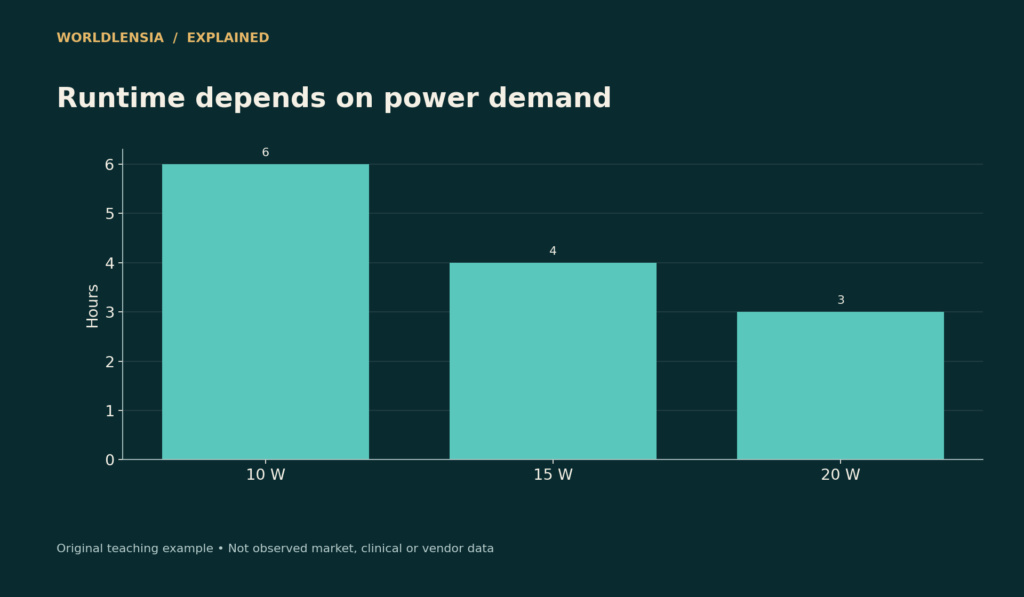
Watt-hours describe energy. Watts describe the rate of power use. A simplified runtime calculation divides usable watt-hours by average watts. A 60 Wh battery supplying an average 10 W supports about six hours under that idealized assumption.
At 15 W the same energy supports four hours; at 20 W it supports three. Real runtime also depends on usable capacity, conversion losses, workload changes, and the device's operating limits. The calculation is an explanatory approximation.
| Illustrative usable energy | Average power | Approximate runtime |
|---|---|---|
| 60 Wh | 10 W | 6 h |
| 60 Wh | 15 W | 4 h |
| 60 Wh | 20 W | 3 h |
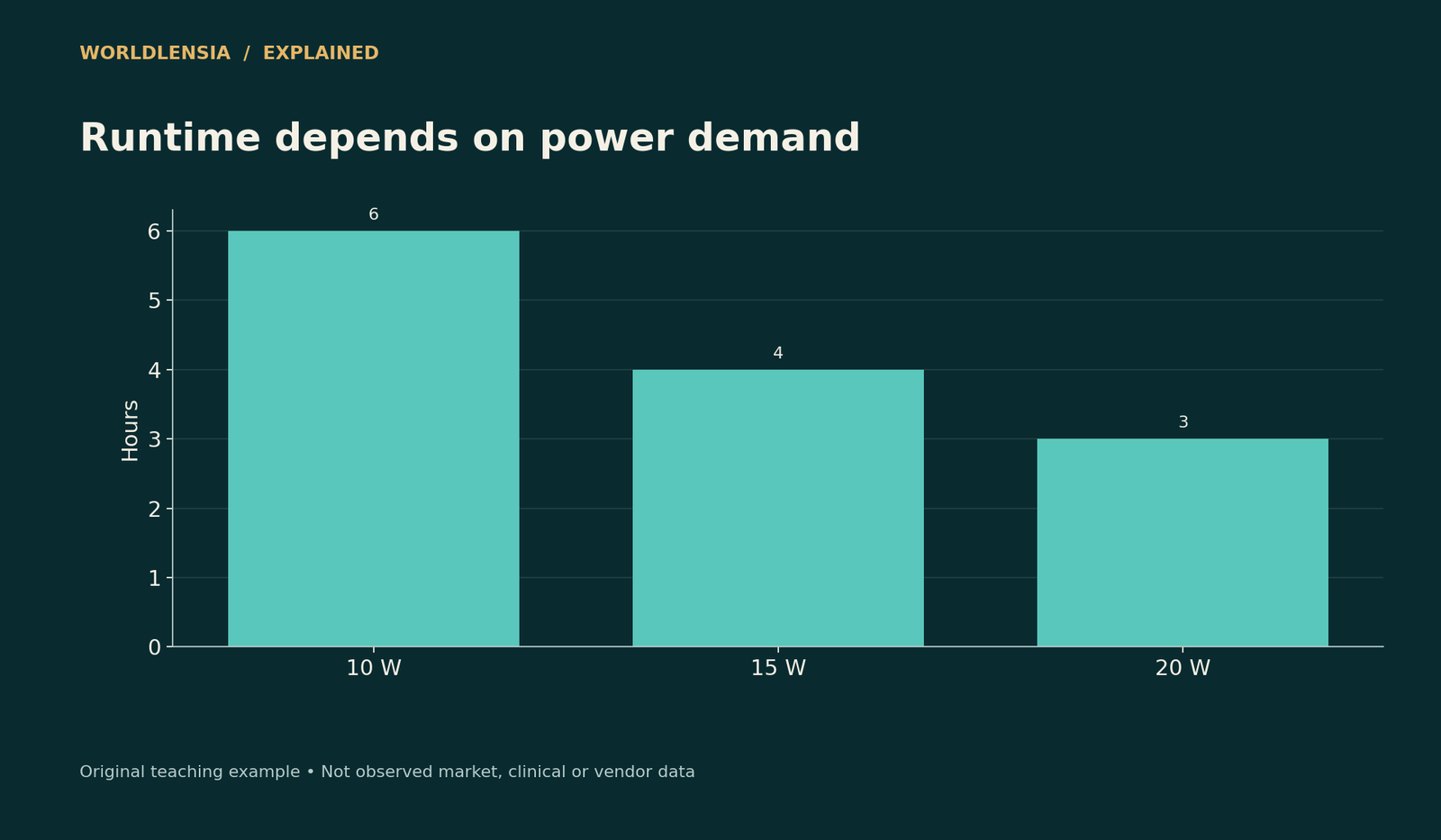
Figure data and assumptions
Original hypothetical teaching data; see the caption and article for assumptions.
| Category | Runtime |
|---|---|
| 10 W | 6.0 |
| 15 W | 4.0 |
| 20 W | 3.0 |
The chart varies only power. It should not be read as a claim that all laptops draw these amounts or that every 60 Wh battery exposes exactly 60 Wh to applications.
Milliamp-hours need voltage context
A capacity stated in mAh cannot be compared directly with watt-hours without voltage information. In simplified terms, Wh = Ah × V. A battery at a different voltage can have the same mAh but store different energy.
For laptop shopping, prefer energy figures and clearly defined test results. Do not compare a power bank's raw cell mAh with a laptop battery's Wh as if the printed numbers were in the same unit. Output conversion and charging losses also matter.
Workload conditions explain the headline
Video playback, light browsing, video conferencing, compiling code, and gaming can produce very different power demand. Check brightness, display refresh rate, network connection, performance mode, and the applications used in a published test.
If two reviewers use different test protocols, their hour counts may not support a precise ranking. Look for comparable conditions or a range across relevant workloads. A test that matches your actual work can be more useful than the highest advertised maximum.
Battery health changes available energy
Lithium-ion batteries deteriorate with age and use. A system can report design capacity and an estimated full-charge capacity. A lower full-charge estimate can help explain shorter runtime, but a single report is not a comprehensive diagnosis.
Microsoft documents a Windows battery report and battery-care features. Follow the device manufacturer's guidance for charging and diagnostics. Do not assume every laptop exposes identical settings or that one charging habit guarantees a fixed battery lifespan.
Charging speed is another comparison
A high-wattage charger does not mean a laptop always accepts that power or that it charges at a constant rate to 100%. Compatibility, battery state, temperature, and the device's charging controls can affect the curve.
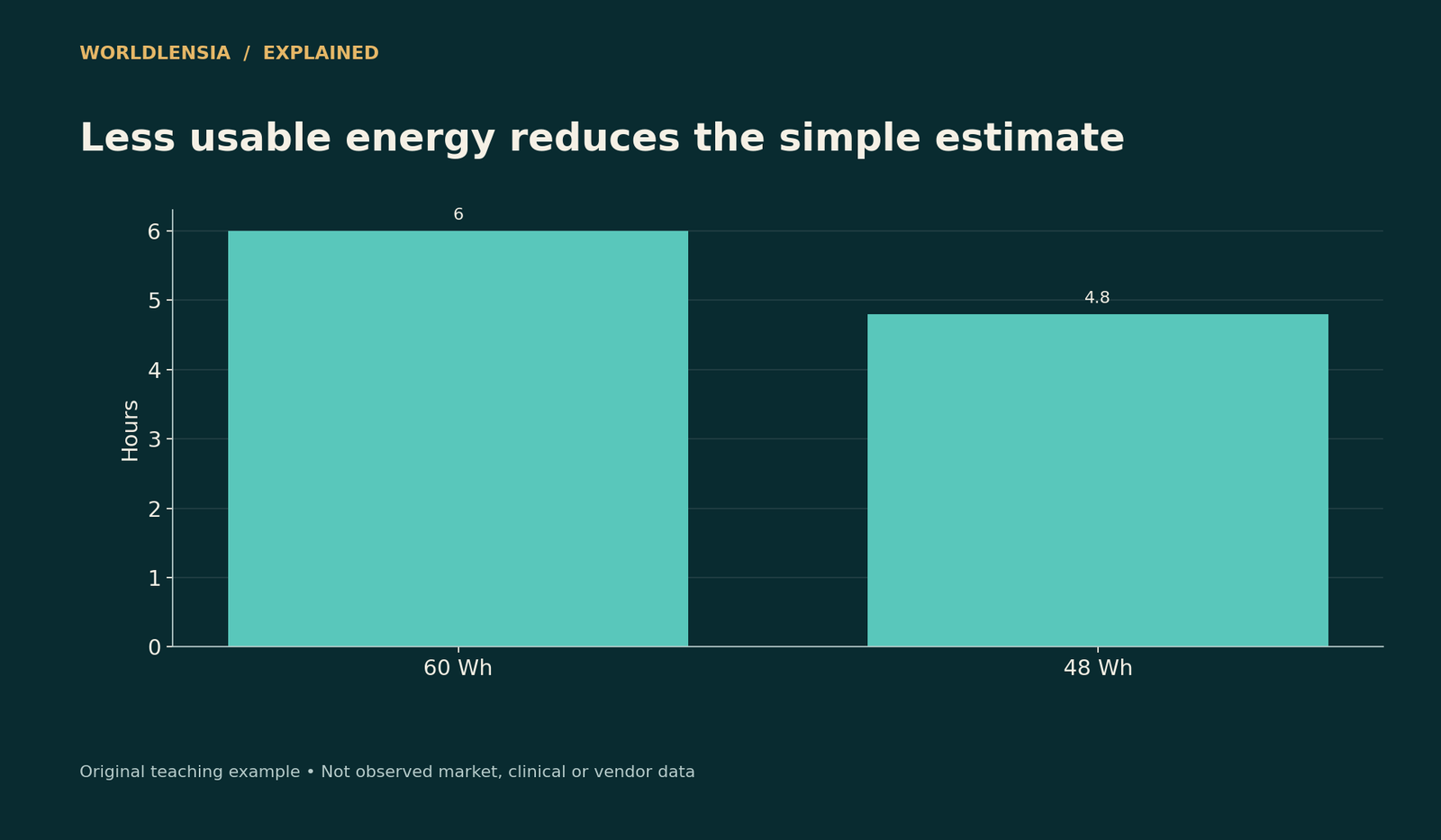
Figure data and assumptions
Original hypothetical teaching data; see the caption and article for assumptions.
| Category | Runtime at 10 W |
|---|---|
| 60 Wh | 6.0 |
| 48 Wh | 4.8 |
Check the exact charger and cable requirements. WorldLensia's USB-C guide explains why connector shape alone does not establish charging, data, or display capability. Runtime and recharge time should be evaluated separately.
Build a useful personal test
Use the same workload, brightness, power mode, and network conditions across runs. Record starting charge, ending threshold, elapsed time, and major interruptions. Avoid comparing one device's fresh battery with another's worn battery without acknowledging the difference.
Run more than one trial if the decision matters. Background updates or unusual application activity can affect a single result. Report the conditions and variability rather than pretending one stopwatch measurement is a universal specification.
Compare health estimates without overstating them
Suppose a battery originally designed for 60 Wh now reports an estimated full-charge capacity of 48 Wh. The ratio is 80%. Under an otherwise unchanged hypothetical 10 W load, the simple runtime estimate falls from six hours to 4.8 hours.
That is not proof that a real laptop will last exactly 4.8 hours. The reported estimate can vary, operating conditions can change, and the usable energy range may differ. Use repeated observations and appropriate diagnostics rather than treating one percentage as a complete health certificate.
For a used-device purchase, ask for the relevant model information and condition records without requesting private files. A report should be checked for consistency with the device and date. Do not infer safety or remaining lifespan solely from a seller's screenshot.
Separate standby drain from active work
A device can lose charge while sleeping or waiting, leaving less energy for active use later. A test that begins immediately after unplugging does not capture a workday involving several long standby periods. Record the actual pattern relevant to the user.
If investigating an unexpected loss, compare system usage information and manufacturer diagnostics. Do not assume that every reduction reflects battery wear; background activity or settings can matter. A useful review distinguishes the symptom, the evidence collected, and the cause actually established.
Keep configuration differences in view
Two laptops with the same family name can use different screens, processors, batteries, or software settings. Match the reviewed configuration to the one being considered. A result from a lower-power display option should not be transferred automatically to a higher-resolution version.
For a published comparison, list those differences beside the runtime result. If a condition was not controlled, state it. A carefully qualified comparison is more useful than an exact hour ranking built from incompatible tests and unknown battery condition.
Make the buying comparison fit the job
List the unplugged tasks you actually need, the duration, the charger you can carry, and acceptable compromises. A device with shorter battery life under heavy work may still suit a desk-based user; a mobile worker may prioritize endurance and charging access.
Use evidence rather than an invented “all-day” definition. A credible review tells readers what was tested and what remains untested, including workloads, battery health, and configuration differences.
Do not turn energy arithmetic into a safety claim
The runtime formula estimates duration under stated assumptions. It does not establish whether a battery, charger, or replacement part is safe. Follow the manufacturer's guidance and use appropriate service channels for damaged, swollen, or malfunctioning equipment. A product article should keep performance comparison separate from safety certification. Likewise, a high reported full-charge capacity does not independently verify a replacement battery's quality or compatibility. Those questions require suitable product documentation and assessment rather than extrapolation from a watt-hour number.
Sources and methodology
Microsoft battery-care and Windows hardware battery documentation were checked October 18, 2026. All watt-hour and runtime examples are original simplified calculations. No product was physically tested for this article.
- Microsoft: Battery care — checked October 18, 2026.
- Microsoft: Battery firmware reporting — checked October 18, 2026.
Continue with USB-C charging and data capabilities and Refurbished electronics checklist for related context.
To check energy use and device condition alongside runtime claims, see Charger Watts vs Energy Use: Measure Input, Output and Time and Refurbished Electronics: A Checklist Beyond the Discount.