
Two cables have the same USB-C plug, yet one charges a laptop while another transfers files more quickly. The connector shape is only the starting point. A useful buying decision checks power, data, and display requirements separately across the entire connection.
At a glance
- USB-C describes a connector system, not one universal performance level.
- Charging capability and data capability are separate specifications.
- The device, port, cable, and accessory all need compatible support.
Read the feature, not just the plug
USB-IF distinguishes USB Type-C from USB Power Delivery and provides separate cable power and data markings. A cable capable of a high charging wattage is not automatically a high-speed data cable. The reverse assumption is also unsafe: a data-rate label alone is not a complete charging specification.
Start with the manufacturer’s requirements for your exact device and task. Charging a phone, copying a large video archive, and connecting a monitor can need different capabilities. Check the port specification as well as the cable packaging.
A fictional shopping comparison
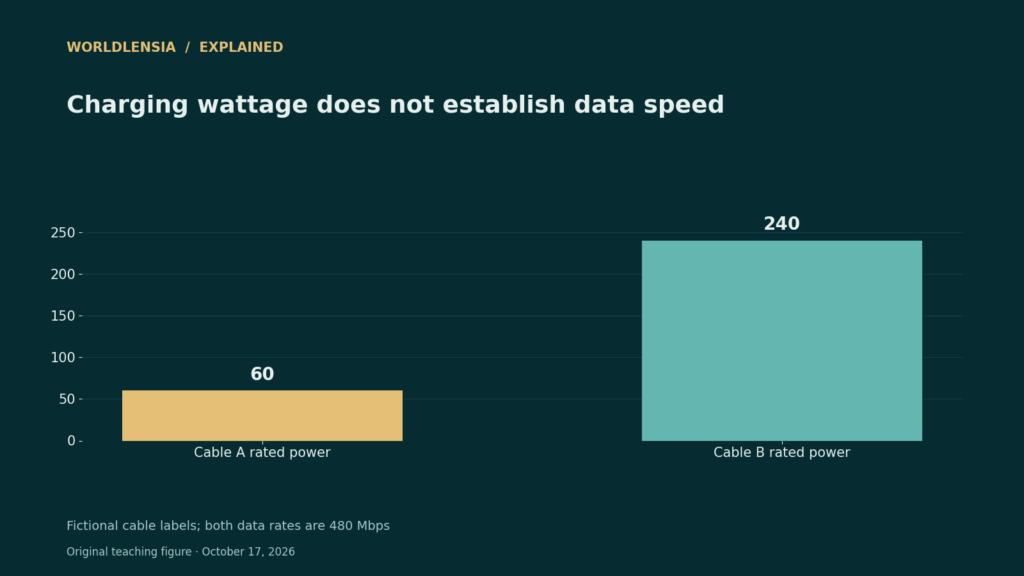
Suppose Cable A is documented for 60 W charging and 480 Mbps data, while Cable B is documented for 240 W charging and the same 480 Mbps data. If a compatible laptop needs 100 W, Cable A cannot provide that requested power level, but Cable B’s higher power rating still does not promise a faster file transfer.
Actual transfer speed also depends on the devices, storage, protocol overhead, and connection. The figures in this example are capability labels, not observed benchmark results. Do not divide a file size by the advertised maximum and promise that real copying will finish in exactly that time.
Check the whole chain
For a display, verify the computer port, supported display mode, cable or adapter, and monitor input. A physically fitting plug does not establish that the source outputs the required video signal. For charging, use compatible equipment from a trusted source and inspect the relevant certification information.
Keep a small label or purchase record with the cable if you own several similar-looking ones. A verified specification is more useful than remembering that one cable was “the expensive one.” Replace an unsuitable accessory based on the missing feature rather than buying the largest number on the box.
A practical comparison
| Fictional specification | Cable A | Cable B |
|---|---|---|
| Power capability | 60 W | 240 W |
| Data capability | 480 Mbps | 480 Mbps |
| 100 W laptop requirement | Insufficient rated power | Check compatible charger and device too |
Before using the result
- Read power and data specifications independently.
- Check exact device and port compatibility.
- Do not claim hands-on performance from a specification sheet.
Continue exploring: our evidence-based product explainers.
Make a task-specific cable checklist
Write down the task before comparing packages: charging, file transfer or a display connection. Then record the exact source port, destination port, supported protocol, required power and cable length. A missing specification is an unanswered compatibility question, not evidence that the cable supports every feature.
USB-IF explains that cable certification does not add capabilities to connected products. Apply a similar reading discipline to IP protection ratings and monitor refresh and response specifications: separate the label’s measured property from the complete task. The fictional cables here are examples, not tested products or purchasing endorsements.
Sources and methodology
Reviewed October 17, 2026. WorldLensia explanatory analysis. Worked examples and the accompanying teaching figure are illustrative, not measured findings or product tests. Consult the linked source for definitions and revisions.
To check the charger and display stages of the same connection, see Charger Watts vs Energy Use: Measure Input, Output and Time.